Out of everything in your ERAS application, the personal statement is the one place a program actually gets to meet you. Your grades and scores say what you can do. This is where they find out why you do it, and how you got here.
AI can shave hours off the writing, no question. The trouble starts when people lean on it too hard. Do that, and your essay ends up sounding like a hundred others in the pile, or worse, like nobody wrote it at all.
The mistake almost everyone makes is throwing the whole thing at one chatbot and hoping for a finished essay. That’s not how these tools work best. Each one is good at a different part of the job.
So this guide breaks the process into stages, compares five tools by what they’re actually good at, and shows you how to use them without sounding like a robot.
Here’s what program directors actually look for as they read through stacks of these essays every season. They’re not hunting for the most impressive one.
Honestly, what they’re after is pretty basic. They want the real you on the page, not some polished version that could be anybody. They want to see that your experiences actually taught you something, not just a rundown of where you’ve been. They want a clear reason you chose this specialty, some sign you’ve grown, and the sense that you’re honest and easy to work with.
Fancy vocabulary won’t move the needle. A genuine reason will. So let AI sharpen how you say things, but keep the story itself yours.
No one tool does all of this well. When you push a single chatbot to brainstorm, edit, fact-check, and polish all at once, the writing tends to go flat and generic.
It works a lot better if you treat writing as steps, and match each step to the tool that’s built for it:
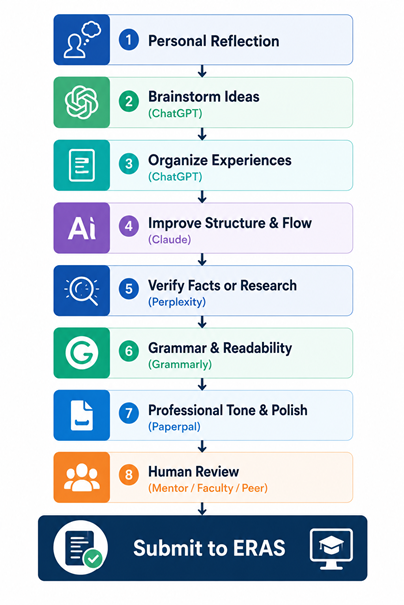
Think of it as a handoff. It starts with your own memories, because that raw material has to come from you and nowhere else. ChatGPT helps you dig out ideas and give them shape. Once you’ve got a draft, Claude smooths out the flow. Perplexity double-checks any facts. Grammarly tidies up the small stuff, and Paperpal adds the professional finish. Then a real person reads it, since no tool can tell you whether it actually sounds like you.
A lot of applicants want to know which AI tool is the best one. That question doesn’t really get you anywhere.
The one worth asking is which tool fits the task in front of you right now. Once you start thinking that way, the picks below fall into place.
ChatGPT earns its keep at the very start, back when you’ve got a pile of experiences and no clue how they fit together.
Say you have three clinical stories and a hunch they’re connected somehow. ChatGPT is good at helping you find that thread. It can pull themes out of messy notes, turn a jumble of ideas into a rough outline, and get you moving again when the blank page has you frozen.
Reach for it when you want to:
The place people trip up is asking it to write the actual essay. Paste that output into ERAS and it reads like a form letter, and readers can feel it. The sentences are smooth enough, but there’s nothing real underneath, because none of the specifics came from you.
Let it open the door. You’re the one who walks through.
Example prompt: “Help me identify the common theme connecting these three clinical experiences.” Then paste short, general notes, never patient details.
Once you’ve got a full draft down, Claude is a solid choice for editing. It tends to do well with longer pieces, which counts for a lot when your whole statement needs to read like one connected story instead of a stack of separate paragraphs.
What it’s really good at is cleaning things up without stripping out your voice. Ask it to fix a clunky transition and it’ll usually leave the words that sound like you alone.
Use it to:
How you ask makes the difference. Tell it to edit gently and protect your tone. Don’t tell it to rewrite.
Example prompt: “Improve the flow and transitions in this draft. Keep my wording and voice as much as possible, and don’t add any new claims or experiences.”
If your essay leans on any facts, Perplexity helps you get them straight. It works from real sources and shows you where its answers came from, so you can check something before it ends up in your statement.
It comes in handy when you mention:
One thing to watch, though. A personal statement isn’t a literature review. Nobody reading it wants a wall of stats. They want to know who you are.
Only pull in a fact when it actually makes your story stronger, like giving context to why a research project meant something to you. If a detail doesn’t connect back to your own experience, cut it. The facts are there to serve the story, not run it.
After your ideas and flow are locked in, Grammarly takes care of the cleanup. It catches the little slips that yank a reader out of your story: the missing comma, the tense that’s off, the sentence that just keeps going.
Lean on it for:
Here’s what people tend to get backward. An essay that’s easy to read beats an impressive one every single time. If a program director has to read your sentence twice to figure out what you meant, that big vocabulary didn’t help you. It got in the way.
Clear, simple writing shows you can communicate, and every specialty cares about that. So let Grammarly make your sentences easy to follow, and leave the thesaurus in the drawer.
Paperpal is made for academic and professional writing, which makes it a good last pass. By the time you get here, your story is set, the flow reads well, and the grammar’s clean. Paperpal just tightens the tone so the whole thing sounds like it came from a professional.
It helps your writing come across as:
Notice where it lands in the lineup: dead last. That order isn’t an accident. Start with a polishing tool and you’re buffing sentences before you even know what you’re trying to say, and you end up with something shiny sitting on a shaky foundation.
Do the thinking first and save the polishing for the end. Paperpal is the finishing touch, not the place you begin.
This is the one line you can’t step over. AI can help you say something better. It should never make something up on your behalf.
That means:
When AI drops in a touching moment you didn’t live through, sure, it might read nicely. But it isn’t true. And interviewers ask about your statement. Made-up stories tend to unravel the second someone asks a follow-up question.
Your experiences belong to you, so keep it that way. Program directors would take an honest essay over a flawless one any day, and they’re pretty good at telling the difference.
AI writing has a few habits that give it away. Once you can spot them, you’ll catch them in your own draft too.
Keep an eye out for lines like these:
They read fine on the surface, but they don’t actually say anything. Anybody could have written them.
Swap them for the real stuff:
Whenever an AI suggestion comes back a little too smooth, put it back in your own plain words.
We help you sharpen your story and strengths so the essay reads unmistakably like you, not a chatbot.
Public AI tools aren’t private notebooks. Whatever you paste in can get stored or used to train the model, so think twice about what goes in there.
Keep these out:
Blur the details first. “A 60-year-old patient” is fine. A real name and date are not. You can explain what an experience taught you without ever handing over the actual records, so strip out anything sensitive before it touches a chatbot.
AI can fix your grammar all day. What it can’t tell you is whether your essay actually lands.
A tool has no idea if a story moves someone, if it sounds like the real you, or if it fits the specialty you’re going after. It can’t read your essay the way a program director will.
A person can, though. So find someone who knows you and knows the field:
Their read catches the things no tool ever will. Get real eyes on it before you send it off.
Get the human final read the whole workflow points to from editors who know what program directors respond to.
| Writing Stage | Recommended Tool | Why It Works |
| Brainstorming | ChatGPT | Generates ideas and outlines |
| Structure | Claude | Improves organization and flow |
| Fact-checking | Perplexity | Verifies medical information and sources |
| Grammar | Grammarly | Fixes grammar and readability |
| Final polish | Paperpal | Refines professional tone |
No detector flags AI for certain, and most programs don’t even run them. But a seasoned reader can tell when an essay feels generic or empty. The real danger isn’t getting caught. It’s turning in something that doesn’t sound like you.
Yes, for brainstorming, outlining, and getting unstuck. What’s not okay is having it write the essay for you. Treat it like a helper and keep the words and stories your own.
ChatGPT is a good pick here. It’s strong at finding themes, sorting out scattered ideas, and building an outline from your notes.
It can. Tools like Grammarly stick to grammar, punctuation, and clarity and leave your voice alone. Just look over each suggestion so you stay in charge of how you sound.
You don’t need to flag light editing help any more than you’d mention running spell-check. What matters is that the ideas, the stories, and the voice are genuinely yours.
Be careful with it. Take out patient identifiers, PHI, and anything confidential first. Generalize the sensitive details before you paste anything into a public tool.
No. AI can’t judge emotional impact, authenticity, or whether you fit a specialty. Feedback from people who know you and the field is still the part you can’t skip.
AI is at its best as an assistant, not a ghostwriter. Use it that way, and it buys you time. Let it take the wheel and the essay stops being yours. Every tool has its lane. ChatGPT for ideas, Claude for flow, Perplexity for facts, Grammarly for grammar, and Paperpal for the final polish. And a human reads it last. Through all of it, guard your privacy and keep every experience honest. Then pass it to someone you trust before you hit submit.
One last thing worth holding onto: the strongest personal statements aren’t the most polished ones. They’re the ones that feel real. Write yours so it sounds like you, because that’s the whole point.
IMG HELPING HANDS – PERSONAL STATEMENT EDITING
Every tool in this guide has a lane, but the last step is the one no chatbot can do: a person who knows the specialty telling you whether your essay actually lands. At IMG Helping Hands, editors who’ve read hundreds of applications sharpen your draft around your real story and strengths, so it reads honest, specific, and unmistakably you.
Line-by-line feedback. Full revision with tracked changes. Voice preserved. IMG gap and story positioning.
The strongest statements aren’t the most polished. They’re the ones that feel real.
Articles published by IMG Helping Hands are prepared by our team using information from direct experience, publicly available resources, and educational references. AI tools may be used to assist with drafting, proofreading, and formatting; however, all content undergoes review and approval before publication.
The information provided is intended for educational purposes only. Requirements, policies, and processes may change over time. Readers should consult official sources for the most current information.