
The CCS cases are the part most IMGs are worried about for their Step 3 preparation. That makes sense. You don’t pick an answer and move on. You take over a patient’s care. You order the tests, start the treatment, keep an eye on the vitals, move the patient to the right place, and push the clock forward to see what happens. So knowing the medicine is only half the job. You also need a plan, and you need to know your way around the software.
How many CCS cases are on Step 3? Day 2 currently has 13–14 computer-based case simulations. You get up to 10 or 20 minutes of real time for each one.
Below, we’ll walk through how the cases work, a simple way to approach them, the mistakes that cost people points, and how to practice without wasting time. If you’re still mapping out the rest of your Step 3 preparation, start there and come back to CCS once Day 1 is planned.
CCS stands for Computer-based Case Simulations. You’ll see them on Day 2 of Step 3, which USMLE calls Advanced Clinical Medicine.
Each case gives you one patient. You might meet them in a clinic, the emergency department, a hospital ward, the ICU, or at home. As simulated time passes, the patient changes. Some of that comes from the disease itself, and some comes from what you do. Give the right treatment, and they get better. Miss a key step, and they can go downhill.
USMLE describes CCS as dynamic simulations built to test diagnosis, treatment, and monitoring.
What CCS is really looking for
Getting the diagnosis is part of it, but the cases also check whether you can:
If that list sounds a lot like your normal workday as a doctor, that’s the point. It’s also why hands-on US clinical experience transfers so directly to CCS, the reasoning is the same, only the interface changes.
Right now, Step 3 has 13-14 CCS cases, and each one gives you a maximum of 10 or 20 minutes of real time.
There are two clocks running during every case, and mixing them up is one of the most common sources of confusion.
| Type of time | What it means |
| Real time | The minutes you actually have to work on the case |
| Simulated time | The time that passes for the patient |
Say you spend five real minutes typing in orders. During that same stretch, the patient’s timeline might jump ahead by several hours or even a few days. The USMLE tutorial mentions that some cases play out over days, weeks, or longer.
Get comfortable with this idea early. A lot of the format clicks once it does.
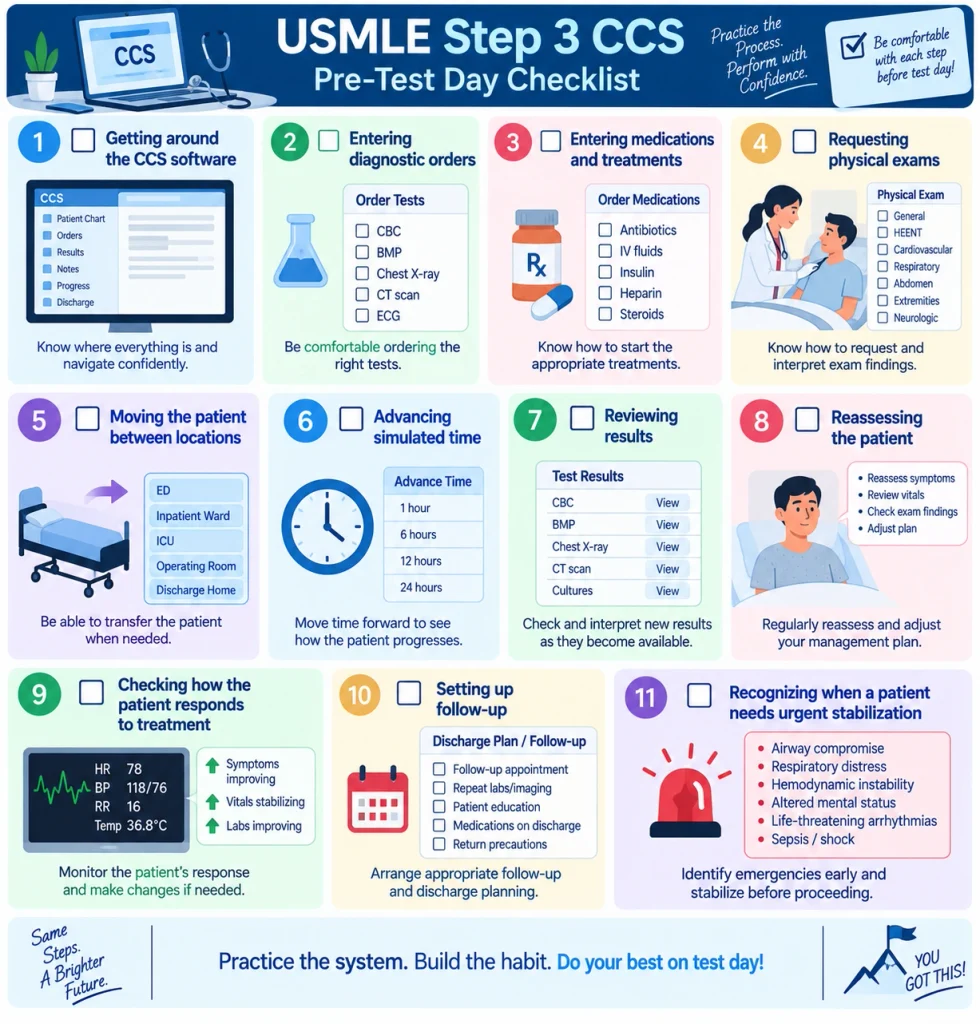
The cases change, but the basic flow stays pretty much the same. Once you’ve seen it a few times, new cases feel a lot less intimidating.
Look at the chief complaint, age and sex, where the patient is, the vital signs, and any history you’re given. Above all, check whether anything looks dangerous right now.
Is this patient stable or not? That one question sets the tone for everything else. If they’re unstable, stabilize first. The full workup can wait. Airway, breathing, and circulation can’t.
Pick tests that fit the story. That could mean labs, imaging, other studies, monitoring, a focused physical exam, or a consult if it’s really needed.
You earn credit for managing the patient. Knowing it’s pneumonia doesn’t help much if you never start antibiotics.
People forget this step all the time. Placing an order doesn’t mean you’ll see the result immediately. You have to move the clock forward to get results back and to see whether your treatment is working.
When results come in or the patient’s condition shifts, take another look. Maybe your differential needs updating. Maybe a medication needs adjusting, an order can be canceled, or the patient belongs in a higher level of care. Make those changes.
With chronic or outpatient cases, don’t stop at the main problem. Set up follow-up, keep track of medications, cover preventive care and counseling, and decide where the patient should go next.
Trying to memorize huge order lists usually backfires. Under exam pressure, half of it disappears from your head. A short framework you can repeat every time holds up much better. Here’s one we call S-A-F-E-R:
S: Stabilize. Look at the vitals and the overall picture. If the patient is crashing, deal with that first with oxygen, IV access, fluids, or whatever else they urgently need.
A: Assess. Get a focused history and do the parts of the exam that matter. You’re looking for clues about what’s going on.
F: Find the diagnosis. Order tests that help confirm or rule out your top possibilities. Each test should have a reason.
E: Execute treatment. Treat what you think is happening. That includes supportive care, specific therapy, and monitoring.
R: Reassess. Move the clock, check results, and see how the patient is doing. Adjust as needed, then think about follow-up and prevention.
It works for most cases, whether it’s a crushing chest pain in the ER or a routine diabetes check in clinic.
Ordering everything you can think of won’t help you. Grouping orders by what they’re for keeps your thinking organized.
Diagnostic orders: CBC, BMP or CMP, urinalysis, cultures, ECG, imaging, and tests specific to the suspected disease.
Therapeutic orders: Medications, IV fluids, oxygen if the patient needs it, procedures, and disease-specific treatment.
Monitoring orders: Vital signs, cardiac monitoring, pulse oximetry, urine output, and repeat labs.
Consultations: Call a specialist when the patient actually needs one, like surgery for an acute abdomen. Consulting everyone in the hospital won’t earn you anything.
Preventive care: Screening, vaccines, help with quitting smoking, counseling, and follow-up visits.
Here’s something USMLE spells out clearly: you’re the doctor in charge of this patient for the whole case. Nobody else on the team is going to place orders for you. If the patient needs something, you have to order it yourself.
Tip 1: Stop thinking like it’s a multiple-choice question. The diagnosis is where the work starts, not where it ends.
Tip 2: Stabilize first. A sick patient needs urgent care before a long list of tests.
Tip 3: Be picky with your orders. Extra tests can hurt you. Before you order something, ask yourself whether the result would change what you do.
Tip 4: Keep monitoring. If you start treatment and never check on the patient again, the job isn’t done.
Tip 5: Move the clock. No time passing means no results and no response to treatment.
Tip 6: Check in after big interventions. A good question to ask is, “If this worked, what should I see next?”
Tip 7: Get to know the software early. USMLE itself suggests using its interactive practice, since being comfortable with the interface can affect how you do.
It feels great to nail the diagnosis. But CCS grades how you manage the patient, and the diagnosis is only one piece of that.
If the patient is unstable, the workup has to wait until they’re safe.
Random orders eat up your time and don’t show good judgment.
Vitals, pulse oximetry, and repeat labs are how you find out whether your plan is working.
If you never move the clock, results don’t come back and the case just sits there.
A high potassium or a dropping blood pressure needs action. Noticing it isn’t enough.
A septic patient might need the ICU. A patient who’s doing well might be ready to go home.
Clinic cases often expect you to think about screening, vaccines, and counseling.
On test day, the cases come one after another. Doing several in a row during practice helps you build stamina.
You can know the medicine cold and still lose points because the software slows you down. USMLE recommends getting familiar with it before the exam for exactly this reason.
Ordering, monitoring, reassessing, moving a patient to the right level of care. Hands-on US rotations build the same instincts the simulation grades.
No official “best cases” list exists. It’s more useful to practice by type of presentation, so you see the patterns that show up again and again.
These are the same presentations that fill a US medical floor, which is why applicants who have done rotations where they manage these patients tend to find CCS more familiar than the software suggests.
A question that comes up a lot is whether to use the official practice or a third-party simulator. Honestly, they do different jobs.
| Feature | Official USMLE practice | Third-party CCS simulator |
| Purpose | Learn the actual exam software | More case practice |
| Interface familiarity | Directly relevant | Depends on the simulator |
| Official cases | Yes | No |
| Feedback | Official case feedback | Depends on the provider |
| Case volume | Limited | Varies |
| Best use | Getting used to the exam interface | Extra repetition |
USMLE offers an interactive practice experience with six CCS cases and feedback on each. Third-party tools like UWorld and CCS Cases give you more cases to work through. CCS Cases, for example, advertises more than 180 cases along with a simulator, grading and feedback, and a Step 3 Qbank.
For most people, using both makes the most sense. Go to the official practice for the real interface, and use a simulator when you want more reps.
There isn’t a magic number. Twenty cases you review carefully will usually teach you more than sixty you rush through.
When you’re starting out, focus on the interface. Learn how to enter orders, move the clock, change the patient’s location, and get through a case from start to finish.
Once you’re more comfortable, do enough cases to start spotting the management patterns that repeat across specialties.
In the final week, work on timed cases, a mix of specialties, your weak spots, and several cases in a row.
Begin with the official USMLE cases, then keep adding simulator cases until the whole process feels natural.
Passing before you apply opens H-1B sponsoring programs and strengthens the file. Book a free call and we’ll place Step 3 inside your Match timeline.
On a 10-minute case, keep things moving. Assess quickly, put in the key orders, start treatment, move the clock, reassess, and set up follow-up.
On a 20-minute case, you usually have more breathing room. You can take time to clarify the diagnosis, watch the response to treatment, keep monitoring, work through a longer timeline, and plan follow-up.
Try to keep the two clocks straight in your head. Real time is your time on the exam. Simulated time belongs to the patient. One more clock worth thinking about is the calendar: where Step 3 sits in your ERAS timeline decides whether a pass is on your file before programs review it.
Start here. It’s the closest thing to what you’ll see on test day. USMLE says the practice materials run in a web browser and suggests using Chrome. It’s built for bigger screens, so a laptop or desktop works much better than a phone.
If you’re shopping for a simulator, check for realistic order entry, time that moves the way it does on the real exam, a large order library, feedback after each case, a timed mode, cases from many specialties, and some way to track your progress.
CCS Cases and CCS World are two options. CCS World, for instance, advertises 50 cases across 16 specialties and more than 3,500 searchable orders. Pick whatever fits your budget, your schedule, and the way you like to study.
| Day | Focus |
| Day 1 | Learn the CCS interface and complete the official practice cases |
| Day 2 | Cardiovascular and respiratory cases |
| Day 3 | GI, renal, and endocrine cases |
| Day 4 | Neurology and infectious disease cases |
| Day 5 | OB/GYN, psychiatry, and preventive care cases |
| Day 6 | Mixed timed cases |
| Day 7 | Several cases in a row, then review your mistakes |
Try not to just tally how many cases you’ve done. After each one, take a minute to figure out where you slipped. Was it the diagnosis, the orders, the treatment, the timing, the monitoring, the location, or the follow-up? That habit is what makes practice actually pay off.
CCS means Computer-based Case Simulations. They’re interactive patient cases on Day 2 of Step 3 that test how you diagnose, treat, and follow a patient over time.
There are 13–14 CCS cases in the current format.
Each case gets up to 10 or 20 minutes of real time, depending on the case.
Start with the official USMLE practice software. After that, add simulator cases if you want more practice.
They can feel tough at first. Usually, the hard part isn’t remembering facts. It’s handling the diagnosis, treatment, timing, monitoring, and software all at once. That gets easier with practice.
UWorld is helpful for CCS practice. Still, it’s a good idea to spend time on the official USMLE software too, so the real interface doesn’t surprise you on exam day.
It depends on you. Keep going until the interface, the common management patterns, the timing, and reassessment all feel comfortable.
Not really. USMLE says the practice software works best on a 1920×1080 screen and isn’t made for phones.
The case basically freezes. Results won’t come back, treatments won’t take effect, and you won’t see how the patient is doing.
It can help, but it doesn’t erase the score. A passed Step 3 adds evidence of test readiness and opens programs that sponsor H-1B visas rather than J-1. We cover the full picture in our guide on matching with a low Step 2 CK score.
CCS cases are about taking care of the patient from start to finish. Naming the disease is just one step. What helps most is solid clinical reasoning, sensible orders, timely treatment, steady monitoring, smart use of simulated time, and being at ease with the software.
Begin with the official USMLE practice cases, lean on a simple framework like S-A-F-E-R, and go back over every practice case to see what you missed. And keep the key numbers in mind: the current Step 3 format has 13 to 14 CCS cases, with up to 10 or 20 minutes of real time for each. Practice steadily, and CCS can turn into one of your strongest sections.
Step 3 also does not stand alone. Program directors read it alongside a strong Step 2 CK score, your clinical experience and your letters, and our full roadmap to the Match shows how each piece connects.
Step 3 is one exam on a long road, and where you place it changes what the rest of your application can do. We help international medical graduates work that out:
Articles published by IMG Helping Hands are prepared by our team using information from direct experience, publicly available resources, and educational references. AI tools may be used to assist with drafting, proofreading, and formatting; however, all content undergoes review and approval before publication.
The information provided is intended for educational purposes only. Requirements, policies, and processes may change over time. Readers should consult official sources for the most current information.